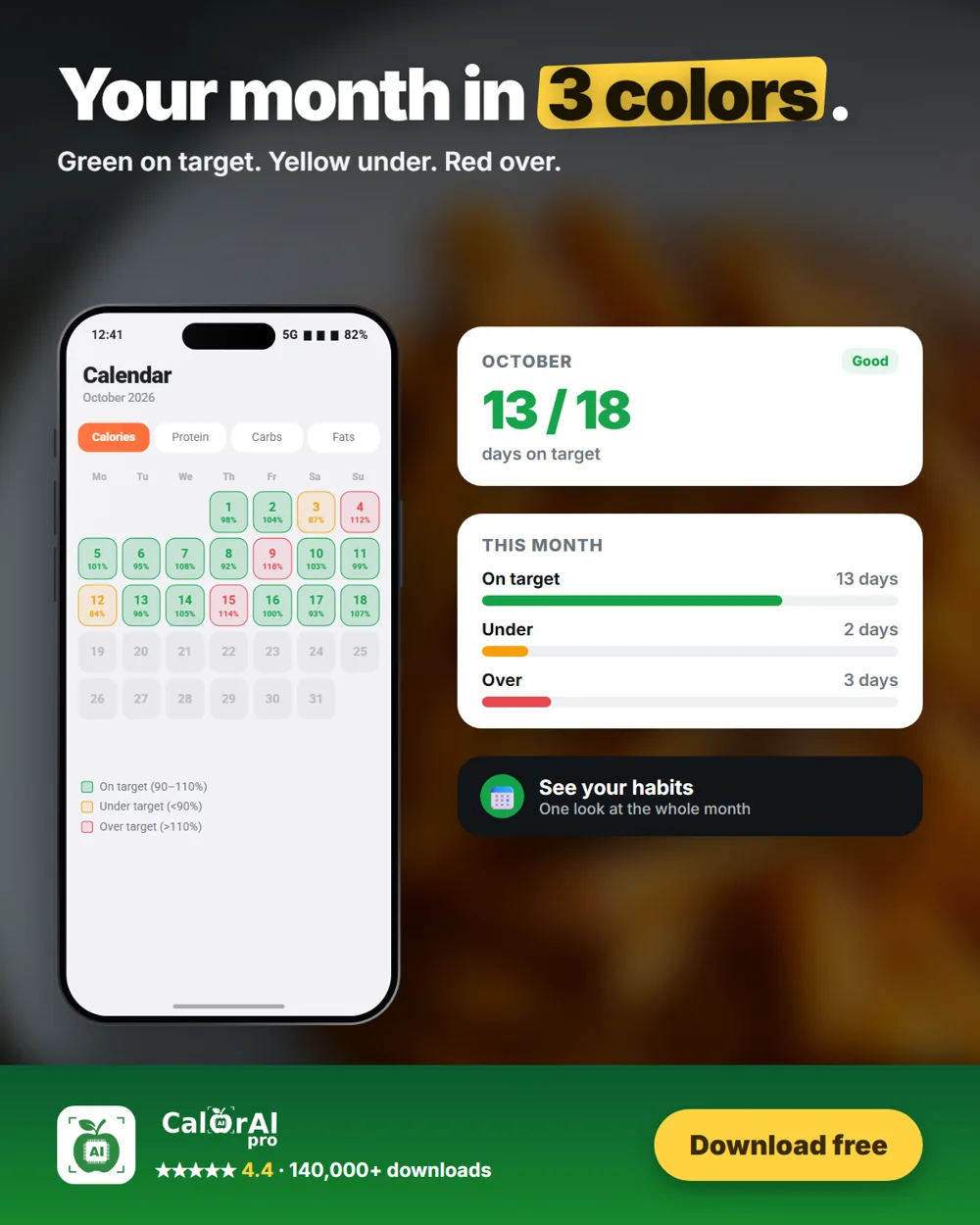
One bad day doesn't decide your progress. Your pattern does, and the CalorAI calendar lets you see it at a glance.
The three colors
| Color | Meaning | Share of your target |
|---|---|---|
| Green | On target | 90–110% |
| Yellow | Under target | Below 90% |
| Red | Over target | Above 110% |
Four views
Switch between Calories, Protein, Carbs and Fats. A day can be green for calories and yellow for protein, which tells you what to change.
Workouts count
If you logged a workout, the calories you burned are added to that day's target before the color is chosen.
What to look for
- Red every Saturday? Plan your weekends ahead.
- Yellow protein most days? Add protein at breakfast.
- Lots of yellow calories? Check that you are logging everything, including drinks.
Reviews of weight-loss research consistently link regular self-monitoring with better results. The calendar makes that review take seconds.
Sources
- Burke LE, Wang J, Sevick MA. Self-monitoring in weight loss: a systematic review of the literature. J Am Diet Assoc, 2011.
- Disclosure: this article is published by the team behind CalorAI.
CalorAI provides estimates for general information only and is not medical advice.